



When the local network cannot access the platform, enable 1.1.1.1 and then try logging in again.
ATAS3 / 常见问题
按账户、支付、游戏或币种任务查找答案,再打开对应图文教程。
ATAS3 教程帮助
先查看简短答案,再打开对应的图示教程,按照完整步骤顺序操作。
8 个教程
账户验证、找回访问资料、更新凭证及关联银行账户。
8 个教程
充值、提款、转账以及账户交易记录。
5 个教程
钱包货币、兑换设置以及 USDT 交易。
Good to know
Practical help for withdrawals, bank accounts, web access, game downloads and connection issues.
Need more help? →Here are two ways to resolve this issue:
Clear your browser cache. If you are using the app, uninstall it, download it again and retry adding the account.
Log in through the web link, add your bank account again and then submit the withdrawal request.
Delete the bank account that cannot be selected, then add it again:
Go to Me → Bank Account Number.
Select Delete.
Select Add bank account.
Enter the complete account information and select Next.
After Success is displayed, submit the withdrawal request again.
Transactions may fail temporarily because of network or banking-system issues. After submitting the order, please wait patiently. The order should be completed within 30 minutes.
Go to the Bank Account page, delete the current bank account and add it again. Then submit the withdrawal order one more time.
Clear your phone’s browser cache or try logging in with another browser. If the web version is still inaccessible, contact customer service for assistance.
Follow the illustrated steps below: install and connect the 1.1.1.1 WARP app, return to 918KISS, select Download and choose the correct version for your device.
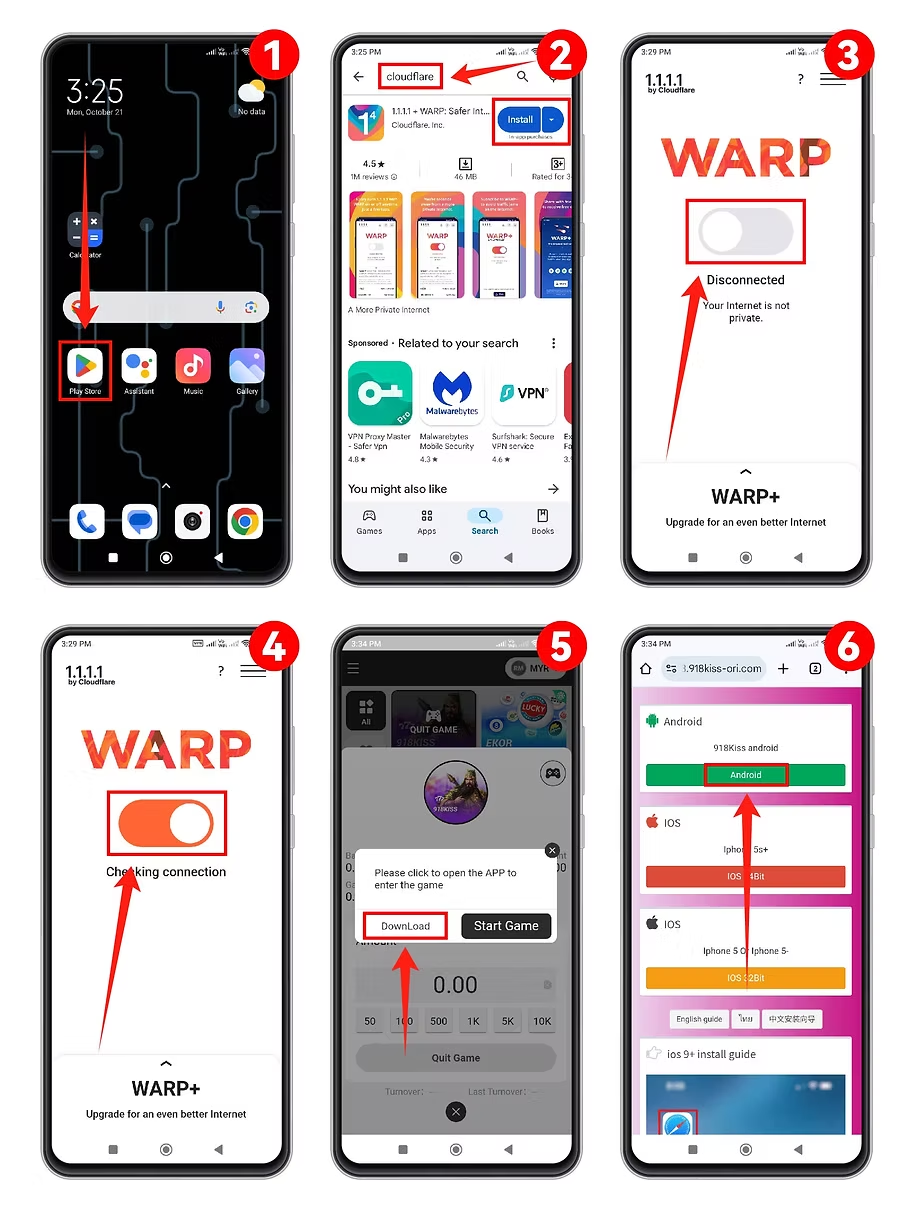
When the local network cannot access the platform, enable 1.1.1.1 and then try logging in again.

When abroad, use TunnelBear VPN to obtain a Singapore, Malaysia or Taiwan IP address, then retry access.
Access to each platform is determined by the user’s IP address. Follow all applicable local rules and regional restrictions.